

Empowering Privacy:
Firefox Lock & Shield Panel Redesign
As Firefox faced declining user trust in an increasingly privacy-conscious market, I led a cross-organizational initiative to redesign our privacy experience. The result: 14% higher user engagement and a new design system foundation that influenced privacy UX across all Mozilla products.
Strategic Impact
360,000,000 Firefox Users Globally
14% Higher User Engagement (est.)
5% Rise in User Retention (est)

Challenges
Mozilla was losing ground to privacy-focused competitors like Brave and DuckDuckGo. User research showed that while Firefox had best-in-class privacy protections, our interface made these features invisible to users—undermining our core brand promise. This wasn't just a UX problem—it was a strategic threat to Mozilla's positioning in the browser market.
For Users
Users struggled to manage and understand their privacy protections in Firefox, which led to-
-
Low engagement with the current lock panel
-
Poor understanding of available privacy choices
-
Difficulty in managing privacy settings effectively
For Business
-
Only 12% of users accessed privacy settings monthly
-
Threatened Mozilla's competitive positioning against Brave and DuckDuckGo - Missed opportunity to convert privacy-conscious users from Chrome
-
Undermined Firefox's core brand differentiation in the marke

Solution Strategy
I proposed a unified privacy panel that would make Firefox's privacy leadership visible and actionable. This required navigating complex technical constraints while establishing new design principles for the organization.
Key Strategic Decisions
1. Platform-First Architecture Instead of designing for web first, I advocated for mobile-native design that could scale up. This controversial decision required convincing engineering leadership to restructure their implementation approach.
2. Educational Integration I pushed for contextual education within the interface—not separate help documentation. This required coordination with product marketing and legal teams to ensure accuracy while maintaining simplicity.
3. Cross-Product Design System I established visual and interaction patterns that could be adopted by other Mozilla products, positioning this work as a foundation rather than a one-off feature.
Design Process

Cross Functional Alignment
Led alignment across 12 stakeholders including product, engineering, legal, and brand teams. Navigated competing priorities and technical constraints while maintaining design vision.
Research Strategy
Designed two-phase research approach that provided actionable data for teams and strategic insights for leadership decision-making.
Research Insights
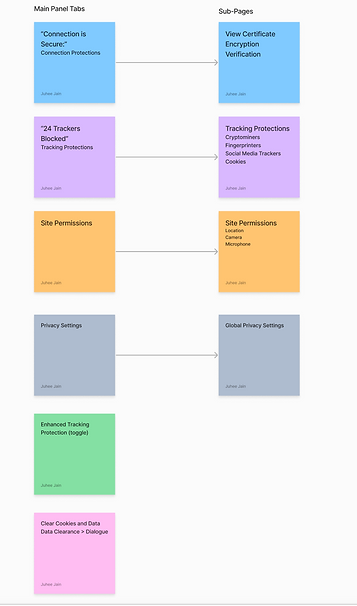
I conducted user testing with general population users to understand privacy behavior and needs.


Stakeholder Communications
Created executive presentations that connected UX metrics to business outcomes, securing continued investment in privacy UX across the organization
Key Design Decisions
-
Unified Interface vs. Feature Separation
-
Decision: Combined lock and shield panels into single interface
-
Trade-off: Increased complexity vs. improved discoverability
-
Result: 14% engagement increase validated the unified approach
-
-
Education vs. Simplicity
-
Decision: Integrated contextual explanations despite space constraints
-
Business rationale: User understanding directly impacts brand trust
-
Implementation: Coordinated with legal team to ensure accuracy
-
-
Cross-platform Consistency vs. Native Patterns
-
Decision: Prioritized Firefox brand consistency while respecting platform conventions
-
Organizational impact: Established principles for all Mozilla mobile products
-
Design Evolution
I started with paper sketches exploring different layouts and iconography. Low-fidelity wireframes helped validate the unified approach before creating high-fidelity designs for both platforms.
Iconography Sketches

Final Concepts


Design Sketches and Flow

Low-fidelity Wireframe Samples


Final Designs
The designs adapted to each platform's conventions while maintaining Firefox's visual identity and core functionality.


iOS
Android


Results & Reflections
Key Outcomes
-
Est. 14% higher engagement with the new unified panel vs. separate lock/shield panels
-
Positive user feedback on design clarity and fox illustrations
-
Improved comprehension of privacy settings based on user testing
Long-term Impact
-
Improved brand positioning in privacy-conscious market
-
Foundation for future privacy product marketing
-
Reduced support tickets related to privacy confusion
Reflection
This project demonstrated how thoughtful UX design can address business challenges while establishing organizational design standards. The patterns and principles we established continue to influence Mozilla's product strategy.
Learnings
-
Privacy UX requires cross-functional collaboration from day one
-
User education can't be an afterthought—it must be integrated into the interface
-
Design systems work best when they solve immediate product needs while establishing future patterns
Explore Other Projects


